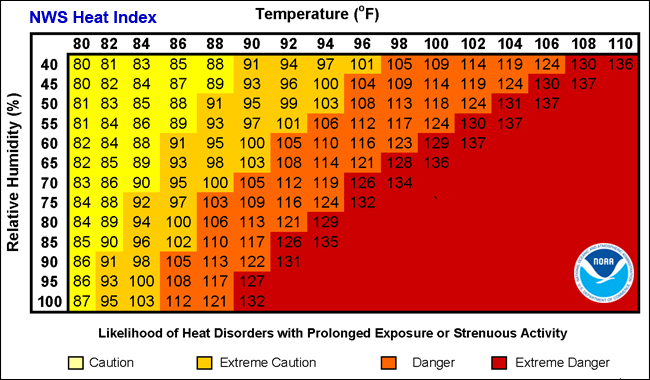
Yes! Any SensorPush sensor with temperature and relative humidity capability (e.g. HT1, HT.w, and HTP.xw) can compute heat index.
How do I set it up?
Go to the sensor settings screen in the SensorPush app. This is the same screen where you set the sensor's name, alert settings, calibration, etc. To access it, just tap the sensor in the main list, then tap the button in the upper-right corner of the graphs screen.
Once you are there, scroll down to "Heat Index" and turn on the toggle switch. That's it! Just like other measurements, you can also set up high and low limits and enable alerts if you like.
What is Heat Index?
The heat index is a measure of how hot it feels when relative humidity is factored in with the actual air temperature. High humidity reduces the body’s ability to cool itself through sweating, making the air feel hotter than the thermometer reading alone. The heat index is commonly used to assess comfort, safety, and potential health risks during warm weather.
How is it calculated?
The heat index is calculated using a formula developed by the U.S. National Weather Service (part of NOAA). It combines air temperature and relative humidity to estimate how hot conditions feel to the human body. At lower temperatures, a simpler approximation is used, but for hot, humid weather the full equation provides a more accurate result.
Heat index is intended for hot/humid conditions. As a result, the calculations may produce misleading results at temperatures below 80°F (26.7°C) or when relative humidity is under 40%.